
Live data, right in the conversation
Live conversations that talk to the systems you already run.
Your customer asks something in the thread, and the conversation calls another system right then: a catalog, a forecast, a booking calendar or your own API. The real answer comes back in the very next message, on RCS, on WhatsApp, on the web and in the AI Concierge. Every example on this page does it for real, and the first one fetches a dog.
- Dog CEO
- Open Trivia DB
- Open Library
- Zippopotam.us
- Open-Meteo
- PokeAPI
Good boy, running for real: a dog photo from Dog CEO, then a question from Open Trivia DB.
In the moment
The answer comes straight from the source
A moment that takes action calls another system the instant the conversation reaches it. It sends what the customer just said, reads what comes back and hands the useful parts to the next message. In the roof inspection example, a ZIP code becomes a place, the place becomes a forecast, and the forecast becomes either a booking or a friendly suggestion to pick another day.
Nothing is copied ahead of time, so every answer is as fresh as the system it came from. And the same call works on every channel: the dog arrives as a picture and the trivia answers as choices to tap, while in the AI Concierge a visitor can simply ask in their own words.
- Customer15237
- Converse calls
GET api.zippopotam.us/us/15237200 · latitude 40.5488, longitude -80.0474 - CustomerSaturday, October 3
- Converse calls
GET api.open-meteo.com/v1/forecast200 · Partly cloudy, a 0% chance of rain - The conversationLooks dry: Partly cloudy, 47.9 to 64.8 F, a 0% chance of rain.
Four live examples
Try every one, right now
Each example is a real conversation that calls a free public service anyone can use without signing in. Open it in the RCS emulator, text it to your own phone, try it on WhatsApp, or take the embed code and put it on a page of your own. They only read, so running them for real is always safe.
-
Good boy · two services
A random dog photo, then a trivia question
Two moments that take action in a row. A dog arrives from Dog CEO as a picture, not a link, then a question arrives from Open Trivia DB with its answers as choices to tap, in alphabetical order so the right one is never always first.
Fun fact: the trivia service takes one question every five seconds. When it says slow down, Good boy says so plainly and ends politely. That is its could-not-reach lane at work.
Codes: RCS emulator
K642K4Q· AI Concierge9RE9FGJ· Text it10Y0697· WhatsAppVFNC5TD -
Book nerd · Open Library
Type an ISBN, get the book
One call, three requests in a row on Open Library: it searches by the ISBN, reads the book’s work for what it’s about, then reads each author, one request per author. Back come the title, the authors, the first year in print and the story.
Try 9780060853983. It’s Good Omens: two authors, so two author requests, and the answer reads Terry Pratchett, Neil Gaiman. An ISBN the catalog doesn’t know asks for another one.
Codes: RCS emulator
SDXXVEE· AI ConciergeDTZH19M· Text itTR8YH8F· WhatsAppSBPK4C3 -
Is it a good day for a roof inspection? · two services
A ZIP code becomes a place becomes a forecast
Give it the house’s ZIP code and a day. Zippopotam.us turns the ZIP code into a latitude and longitude, Open-Meteo reads that day’s forecast there, and the conversation books the inspection when it looks dry, or offers another day when rain is likely.
Try 15237 and any day in the next two weeks. Then try 00000, a ZIP code that matches no place, or a day further out than the forecast reaches: each one takes its own lane. The AI Concierge in the corner of this page runs this one too. Give it the ZIP code, then ask “Will it rain on Saturday?” and it looks the forecast up live.
Codes: RCS emulator
3K4ASMZ· AI Concierge5FK3696· Text it320B26Q· WhatsAppJ84J7C4 -
Pokedex buddy · PokeAPI
Name a Pokemon, get its number, types and size
One call to PokeAPI. Its full answer is about 300 KB, every move in every game, and the call keeps just the handful of fields the conversation needs. Ask for Charizard and the answer reads #6 Charizard, fire and flying type, 1.7 m tall, 90.5 kg.
Try a name that isn’t a Pokemon. PokeAPI answers that it doesn’t know it, and that “no” is a normal answer with a lane of its own: there’s no Pokemon by that name, so try another.
Codes: RCS emulator
Q418CJN· AI ConciergeQ3GR5T1· Text itMEN9SZG· WhatsApp15GYZQK
Text it opens your messages with the example’s code ready to send to +1 412-226-9565. The first time, your phone is registered for Listrak’s private test sender, which can take up to 24 hours, and a message asks you to opt in to RCS messages from Listrak Service. After that, every demo starts the moment you text its code.
Related conversations
Everything within reach
A customer rarely comes for just one thing. Converse can show your other conversations right beside the one they’re in, so the next thing they need is a single tap away: in a rail on a wide desktop, in a strip of bubbles on the phone, or in the Topics sheet. And when your business needs a yes before a chat begins, the conversation can ask for it first. Everything below runs for real: Scout, Good boy, Book nerd and Holly on the same demo workspace as the examples above, and Maison Vale, our demo shop.
The wide desktop, three ways
Good boy on your website, in the look you choose
The same conversation can live on your website three ways. Scout, Good boy’s AI Concierge, chats. The RCS look is the rich messaging thread in a box, with its cards and quick replies, styled to your brand. The web runner walks a visitor through each moment as a form. Pick a look in the window’s bar: on a desktop the AI Concierge and the RCS look open wide, the conversation at an easy reading width and a rail down the left with New conversation and the conversations related to this one.
On a page of your own, an inline chat or RCS box 880 pixels wide or more shows the rail by itself. In the corner, add data-wide="true" to the tag and it opens wide, with an expand button the visitor can press to switch between wide and narrow.
Good boy on the RCS emulator, its related conversations in a strip under the header.
In a narrow box
A strip of bubbles, and a tap to the next conversation
In a narrow box, like a phone’s screen or the corner of a page, the related conversations ride in a strip of bubbles under the header that scrolls left and right. Tap one and it starts on the same screen. When the author says so, the values the page passed in come along too, so the next conversation already knows what the first one was told.
Or they wait in a sheet behind one button in the header, so the thread stays clear until someone asks for more. Book nerd, below, shows it.
It’s one setting on the conversation. In the builder, open its Settings, then Related conversations: pick the conversations and choose where they show, as bubbles, in the Topics sheet or in a side rail on a wide screen. Converse gives each one its own code on the face it shows on, so every tap is counted in Launch Control.
In a sheet
One button, and the rest wait in a sheet
Book nerd keeps its related conversations behind one button in the header, Do more. Tap it and a sheet rises inside the box with a row for each. The button says Do more unless you give it words of your own, up to 20 characters.
Book nerd on the RCS emulator. Tap Do more in the header to open the sheet.
At a shop
The shop’s other help, a tap away
Maison Vale is our demo shop on a Shopify test store. Shop Maison Vale helps you find something you’ll love, and its bubbles hold three more conversations: Find your size, Care for your pieces and Style it. Each one hands you back to the shop when it’s done.
Shop Maison Vale on the RCS emulator, with Find your size, Care for your pieces and Style it in the strip.
Codes: Good boy, three looks: AI Concierge JNMEJ0Y, RCS look WHJ37ZW, web runner AJFJQAX · Good boy on the RCS emulator 1BRFBJ2 · Book nerd, related as a sheet: RCS emulator N79P983, AI Concierge FV070N4 · Maison Vale, related as bubbles: RCS emulator 45F49HM, AI Concierge V5WYBKQ · Holly, ask before the chat 40A44RE
Under the hood
Define a call once, then use it in any conversation
Behind every example is a call you can open, read and test in the Portal. These are real screens from the demo workspace the examples run in.
-
1
Define the call
In Integrations, a call says what it takes, the request it sends and what it gives back. Forecast one day takes a latitude, a longitude and a date, sends one GET to /forecast on api.open-meteo.com, and gives back the date, the high, the low, the chance of rain, a summary and the time zone.
Its tests are answers the real service sent, so you can run every one without sending anything, simulate the call, or send it for real and see what comes back.
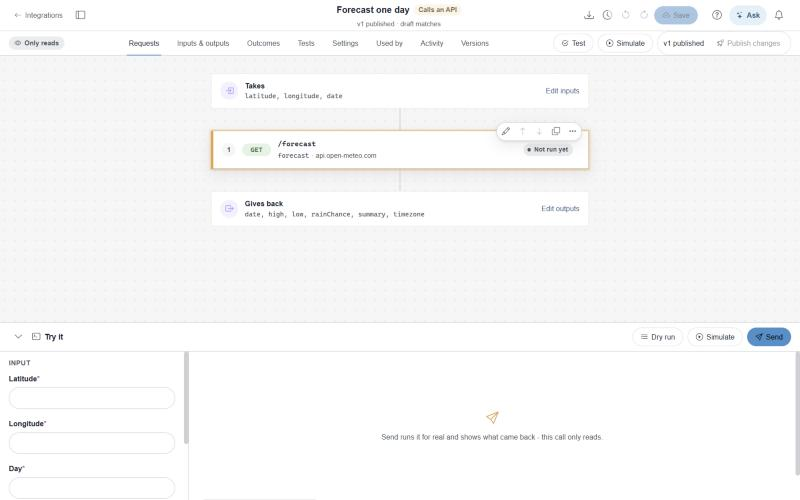
The studio on Forecast one day: what it takes, the one request it sends to Open-Meteo, and what it gives back. Only reads, so Send is always safe. -
2
Drop it into a conversation
On the conversation canvas, right-click a moment and choose Logic, then Add an action after this moment. The picker lists every published call in the workspace with what each one gives back, so the roof inspection can look the forecast up right after it asks for the ZIP code.
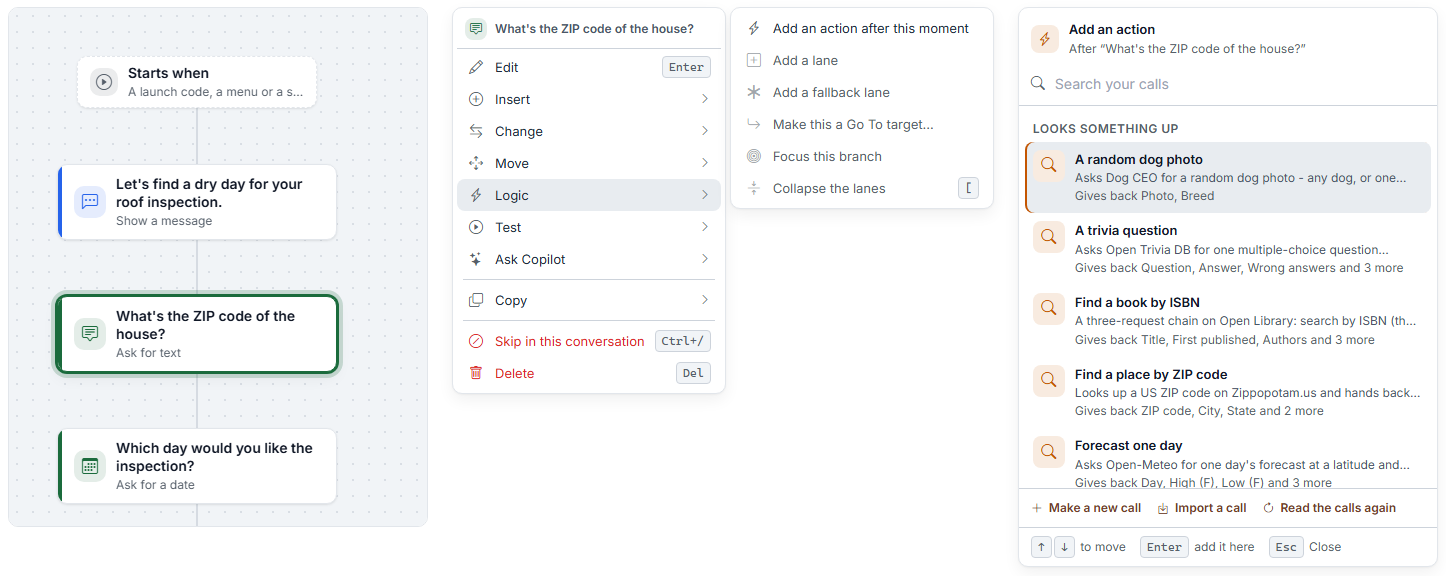
The roof inspection on the canvas. Right-click the ZIP code question, then Logic and Add an action: every published call is one choice away. -
3
Every outcome gets its own lane
A call can end more than one way, and each way gets a lane of its own: the call worked, the other service said no, it couldn’t check just now, or it couldn’t be reached. Only the lane where the call worked carries on, so nothing after it ever shows an answer that never came. Every other lane asks again or ends politely.
Then the answer flows into the next message. A builder types a token, and the customer reads real words:
Looks dry: [[Actions.Weather.summary]], [[Actions.Weather.low]] to [[Actions.Weather.high]] F, a [[Actions.Weather.rainChance]]% chance of rain.Looks dry: Partly cloudy, 47.9 to 64.8 F, a 0% chance of rain.AsksWhat’s the ZIP code of the house?Takes actionFind a place by ZIP codeGET api.zippopotam.usokFound itWhich day would you like the inspection?rejectedNo such ZIP codeI couldn’t find ZIP code 00000. Want to try another?conflictCouldn’t check just nowWe couldn’t check that ZIP code just now - please try again later.couldNotReachThe service is downThe ZIP code service isn’t answering right now - we’ll check again later.
Illustration: the roof inspection’s ZIP code lookup and its four lanes, in the conversation’s own words. -
4
Every call in one place
Integrations lists every call you’ve built: what it does, the connection it goes through, whether it’s published and when it last ran. Publishing freezes a version, and a live conversation keeps the version it was published with, so a call you change never surprises a customer mid-conversation.
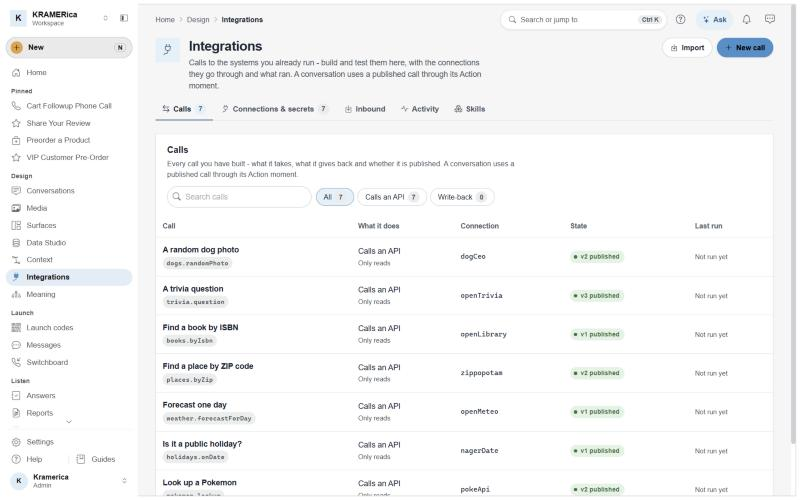
Integrations in the demo workspace: seven calls, each one Calls an API, Only reads and published.
Safe by design
Live, and careful with every system it touches
Calling another company’s systems from a conversation only works if it’s safe every time. Converse decides that in the platform, not in each conversation.
Reads run live
A call that only reads runs for real the moment the conversation reaches it. Every example on this page only reads.
A change waits for a person
Anything that could change another system, like a booking or an order, needs a person’s yes. A moment that writes carries its own confirm, and an AI agent or a script can only simulate a write, or propose it for a person to confirm.
Keys stay secret
Keys and tokens are named secrets. A person enters each one once; it’s encrypted and never shown again, not in the Portal, not to an AI and not in the record of a run.
One guarded door
Every call goes out through one guarded door that reaches only the hosts its connection names, never a private address, and every run is recorded with how it ended.
Gentle with other systems
Before every call, Converse checks your workspace’s switch, its run budget and the other service’s health, so a struggling service gets a rest instead of a flood. A write is never sent twice.
The AI only looks things up
The AI Concierge can use only calls that read, fills in only what the conversation allows, and never treats what it looked up as the customer’s own answer.
Bring your own API
Connect the systems you already run
Most systems you’ll want to call don’t come with a spec, and you don’t need one. Calling your own order system, booking calendar or customer list works exactly like the examples on this page.
- Paste what you have. A curl command, a Postman collection, an OpenAPI document or just a sample answer. Converse drafts the calls and their connection, and a key it finds becomes the name of a secret to fill in, never a saved value.
- Test it. Run its tests over saved answers, simulate it, or send one real read and keep the answer as a test.
- Publish it. Any conversation can add it as a moment, with a lane for every way it can end.
Or ask the copilot in your own words, for example: “Connect to the weather and tell me if it’ll rain at ZIP 15237 on Saturday, then add it to my roof inspection conversation.” It sets up the calls, runs their tests and adds the new moments to your conversation as changes you can look at, undo or save.
Get started
Bring your brand into the conversation
This is a whole new channel for your brand, and it’s only available from Listrak. We’re signing up verified senders right now. If you’d like to see your own conversations running first, sign up for a demo account: hand us a policy, a form or a sentence about what you need, and you can have a working conversation on your own phone in minutes.