
Coupon codes
What this page is for
Coupon codes is where you give your offers their codes. A coupon can carry one code everyone types, a unique code for each member, or a code your tills already know. Here you make the code pools, load codes into them, see how many are left, and look one code up.
What you see
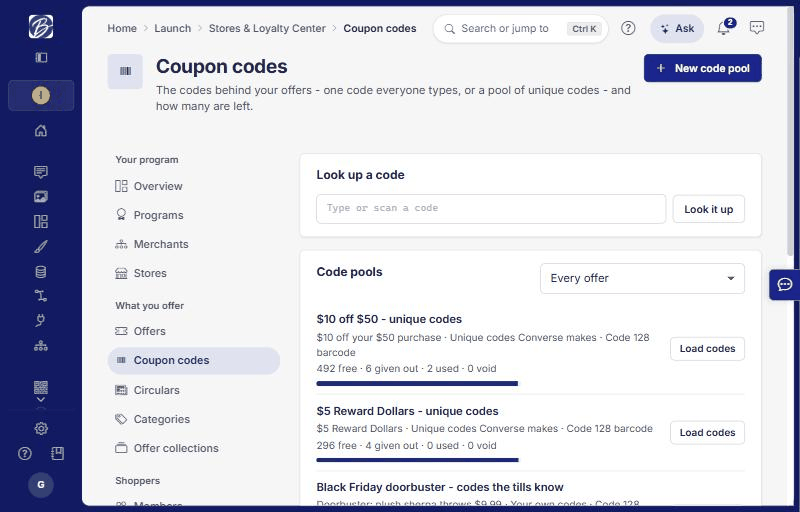
- Look up a code. Type or scan a code and select Look it up to see what it is: its offer, its pool, whether it is free, given to a member, used or void, and when.
- Code pools. One row per pool: its name, its offer, its kind and how the code is shown, and its stock - free, given out, used and void - with a bar for what is left. Running low or Empty shows when a pool needs more codes.
When you work for some merchants only, choose an offer first to see its pools.
What you can do
Make a code pool
- Select New code pool.
- Choose the offer, give the pool a name only your team sees, and choose how the code is shown - the barcode your tills already read.
- Choose the kind: One code everyone types, Unique codes Converse makes or Your own codes.
- Select Make the pool.
A pool keeps its kind. A different kind is a new pool.
Load codes into a pool
- Select Load codes beside the pool.
- For unique codes Converse makes, type how many and how long each is.
- For your own codes, use Paste the codes (one a line) or Or choose a file (a CSV or tab-separated file). A second column is each code's own id in your system - then say Where the codes come from.
- Select Check them. Converse checks every code without loading any, and says which lines it refuses and why.
- Select Load 1,000 codes - the button says how many passed the check. Converse loads exactly the codes it checked.
A code another pool of your workspace already holds is skipped, and the result says how many.
When Converse can't tell whether the codes were loaded, it says so and shows the pool's stock as it is now. Check it before you load again - for codes Converse makes, loading twice makes twice as many.
Void a code that leaked, or free one again
- Look the code up.
- Select Void this code or Make it free again, read what it does, and confirm.
A code a member's ready coupon still holds can't be made free. You can still void it if the code leaked, but after that the member's coupon works at no till - to give them a working coupon, take this one back on the member's Wallet and issue another. Open their wallet takes you there.
Good to know
- When an offer has a pool of unique codes, each item you put in a wallet takes one free code. An empty pool refuses the item, so load more codes first.
- A shared pool holds exactly one code, and it is never used up.
- Making pools and loading codes is for a Loyalty manager at the offer's merchant. Store staff can look a code up.
Related pages
- Offers: the coupons, deals and rewards your codes belong to.
- Members: the wallets the codes go into.
- Redeem at the register: where a code is used.
- Stores & Loyalty Center: your program and the overview.