
Redeem at the register
What this page is for
Redeem at the register is where you take what a shopper shows you - a coupon on their phone, their member number or their phone number - and use it. Converse checks that it can be used at your store today, tells you what it gives, and records the use exactly once, so the same coupon can never be used twice.
What you see
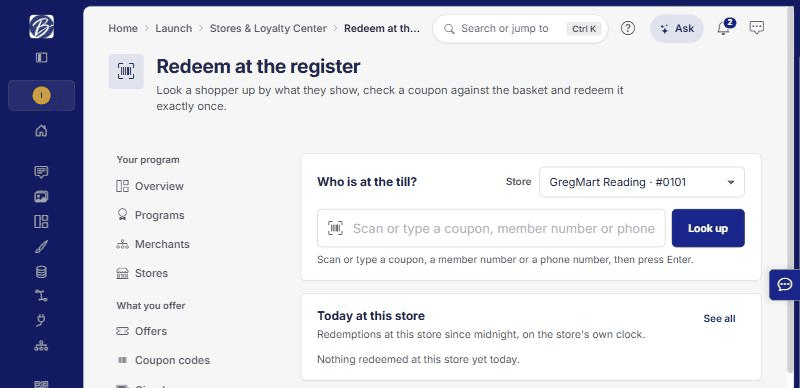
- Your store. The store you are redeeming at, at the top. When you work at more than one, choose it under Store - Converse remembers your choice next time.
- The look-up field. One box for everything a shopper shows: scan a coupon's QR code or the member card in their phone's wallet, or type a coupon code, a member number or a phone number. The cursor waits in it when the page opens, and comes back to it after every look-up and every receipt, so you can work the whole counter with a scanner.
- The shopper. Their name, member number, points balance, tier and visits. You see what the register needs; their phone, email and birthday stay private. When you may open their page, their name opens it.
- What they hold. Every coupon, deal and reward in their wallet, judged for your store right now. What can be used comes first, then what needs a check at the till, then what cannot be used today and why.
- The receipt. After a redemption: what was used, where, when, by whom, what it gave and its receipt number.
- Today at this store. The redemptions made at your store since midnight, on the store's own clock - even when you open a store in another time zone. See all opens the full list.
What you can do
Redeem a coupon a shopper shows you
- Scan the coupon, or type its code, and press Enter. While the desk looks it up, it says so under the field - Looking up SAVE5-7QK2... - and the cursor stays in the look-up field.
- Read the line that says whether it can be used here: it can be used, check at the till first, or it cannot be used now - with the reasons.
- When it asks, type the basket total, so a minimum spend can be judged and points can be earned. Press Enter in the basket to check it again. Add your till's Receipt number if you want to find this redemption later.
- To prove the shopper is at your till, scan the code on your register's screen into the same look-up field. It shows as added under Register code.
- Select Redeem. When it asks you to check at the till, tick the box that says you checked, then select Redeem again.
- Read the receipt, then scan the next shopper's coupon, or select Next shopper.
Look a member up and choose what to use
- Scan the member card in their phone's wallet, or type their member number or phone number, and press Enter.
- Under What they hold, select Use this beside the one they want. Pick another goes back to the list.
- Select Check to see what it gives against the basket without using it, then Redeem.
Record a coupon already used at another till
- Look the coupon up, then select Used at another till?.
- Type the discount the other till gave, and select Record the use. Converse records it so it cannot be used again, and gives no discount itself.
Undo a redemption
- On the receipt, select Undo.
- Under Why, say what went wrong, such as "scanned the wrong coupon". Converse keeps the reason.
- Leave Put the coupon back in the member's wallet ticked to give it back, then select Undo the redemption.
Take an amount from a gift certificate
- Scan or type the code on the gift certificate. The page shows Gift certificate and what is left on it. No member is named, because whoever holds the code spends it.
- Under Amount to take, type how much to take from it, or leave it blank to take the smaller of what is owed and the balance.
- Select Redeem. Whatever is left stays on the certificate for next time.
A gift certificate earns no points. If the shopper is a member, scan their own member card as well.
Good to know
- Redeem uses a coupon once, even if you select it twice or the connection drops. If the first try did land, Converse says it was already redeemed and shows that receipt.
- When Converse can't tell whether a redemption went through, it says so. Select Try again. Even if you scan the coupon another way, change the store or record it as used at another till instead, the coupon is never used twice - when the earlier try did land, you see that receipt.
- Pressing Enter never redeems. Only the Redeem button does, so a scanner can't redeem by accident.
- The same desk opens on a phone at the counter, with the same checks. Select Open the till on your phone, or scan its QR code with your phone's camera.
- From a member's page, Open the register desk opens this page with the member already looked up.
- At the register you can undo a redemption for 10 minutes. After that, your Loyalty manager can still undo it, at any time.
- Undoing keeps the redemption on the record, marked undone, and takes back the points it wrote.
- You only see the stores of the merchants you redeem for. If your store is missing, ask your Loyalty manager to give you the redeemer role at its merchant.
Related pages
- The till on your phone: the same desk on a phone at the counter.
- Redemptions: every redemption, with who, where, when and how much.
- Offers: the coupons, deals and rewards shoppers use.
- Stores: the stores you redeem at.
- Stores & Loyalty Center: your program and the overview.