
Concept demo by Listrak Converse - GregMart is a made-up store. Its offers, stores and shoppers are invented.
Listrak Stores & Loyalty
One wallet that follows the shopper to every screen, live today
The complete system for physical stores and in-store shopping: coupons to clip, deals, this week’s ad, points, visits and a wallet the shopper carries everywhere. It runs on RCS, on WhatsApp, on the web, on a store’s own website and at the till, and it plugs into the systems a retailer already runs. Your visit gets its own made-up shopper and its own wallet, so what you clip here is yours alone.Just now you’re playing GregMart’s shared sample member, Jordan R., so what you clip here lands in a wallet everyone on this page shares.
- The box is Jordan R.’s thread - GregMart’s shared sample member - so a coupon you clip in it lands in Jordan’s wallet. The wallet beside it is your own.Just now the wallet beside it is Jordan’s too.
- Clip the same coupon twice and the thread answers It’s already in your wallet - a coupon is never clipped twice.
- STORES shows the GregMart stores nearest the location you share. Check in then asks for your location once more and measures it against the store’s radius, so if you share where you really are from your desk, the check-in is politely refused - You’re not inside that store yet - and no visit is recorded.
On a real member’s phone, Send it to my phone lands the wallet in their own thread. A made-up shopper has no phone, so watch Jordan’s wallet arrive in the box instead.
You’re playing as your own made-up shopper, a GregMart member made for this visit with the program’s welcome points and an empty wallet. Clip on the store’s website, from the weekly ad or the dial, and it lands in your wallet - yours alone. This browser keeps it for the next half hour, so a reload finds it again; after that, a visit starts with a fresh shopper.
A made-up shopper of your own couldn’t be made just now, so you’re playing as Jordan R., GregMart’s shared sample member - reload in a few minutes for your own. Everyone here shares this wallet, so if a coupon is already clipped, that proves it can’t be clipped twice.
Read the doc
MENU opens GregMart Rewards, the hub. Every other command starts its own short conversation - Coupons, Deals, This week’s ad, Deal hunter, My wallet, My points and Stores - and each command has its own launch code with its own count in Launch Control. Inside the box, a chip hands the shopper on to the next conversation in the same thread, and a bubble in the More at GregMart list starts that conversation fresh on its newest RCS code, so the tap is counted on that code.
Each list is a carousel the shopper taps; each clip and check-in is one tap that is also the yes, so nothing is ever clipped by accident.
The wallet beside it is the wallet add-in: one script tag on any page, signed in as the same shopper the thread knows.
A clip in the thread lands in the same wallet the website shows - one wallet, every screen.
- Loyalty on your website - the add-ins
- Show the add-ins on GregMart
- Playbook: loyalty on the thread developer sign-in
- The loyalty verbs (Actions API 23) developer sign-in
- The loyalty add-ins (embed reference 17) developer sign-in
- Signing a member in developer sign-in
On your customer’s phone
This is what lands on a real phone
Everywhere else on this page the conversation sits in a box, the way it does on a website. Here it is in the frame of the phone in your customer’s pocket: the same GregMart Rewards hub. Text the code and it starts on your own phone.
You’re on a phone already, so skip the picture: tap Text it to my phone and the hub opens in your own messages.
The first time takes a little setup. Text the code - your phone is registered for Listrak’s private test sender; approval can take up to 24 hours. Then a message pops up asking you to opt in to RCS messages from Listrak Service - tap Agree (or Opt in). After that, the conversation starts the moment you text its code.
It’s a made-up store, so unless your number is already a GregMart Rewards member, your phone browses as a guest - the coupons, deals and this week’s ad are all there to look through. Joining GregMart by text comes next.
7:42 AM · the weekly ad reaches her before work
On a store’s own website
Every add-in is one script tag a store pastes where it wants it: its home, this week’s ad, the coupons, the deals, an in-store-only shelf, gift certificates and the wallet. They take the store’s colours and font from their own tag, share one sign-in, and record every offer a shopper opens and every clip for the store.
Tap Not you? in the wallet, then clip here: Converse keeps the coupon in a bag until you sign in, and then it lands.
Try EN, ES, DE or FR in the bar above: the add-ins’ words change; offers speak the language they were written in.
The tag for this tab
Read the doc
Seven add-ins - coupons, deals, the circular, the wallet, a home that is all about the member, gift certificates, and a points badge for the header.
Each is addressed by the workspace and the program, never a launch code; a shelf takes the kinds it shows and a filter it narrows from.
A shopper signs in once - a code to their phone or email, or a ticket the store’s own server mints - and every add-in on the page shares it.
A clip before signing in waits in the bag and lands the moment they sign in.
- Show the add-ins on GregMart
- Weekly circulars
- Circular feeds
- The add-ins’ options developer sign-in
- Playbook: loyalty on your website developer sign-in
Clip it from the weekly ad
GregMart’s weekly ad is real flyer pages, the way a store prints them, and every item on a page is a place to tap. Tap one and its sheet opens with the picture, the sale price against the regular price, and Clip when the item carries a coupon. The coupon lands in the member’s wallet, ready for the till.
Clipping needs a member who is signed in. Here the add-ins are signed in as your own made-up shopper, so a clip lands in your wallet at the top of the page;Just now the add-ins are signed in as GregMart’s shared sample member, Jordan R., so a clip lands in the wallet everyone here shares, at the top of the page; a shopper who isn’t signed in yet clips into a bag that lands the moment they sign in. Every page seen, item tapped and coupon clipped is counted.
Two ads run on GregMart: This Week at GregMart and the Holiday Gift Guide. The page’s tap areas are outlined in the first picture only to show where they are.
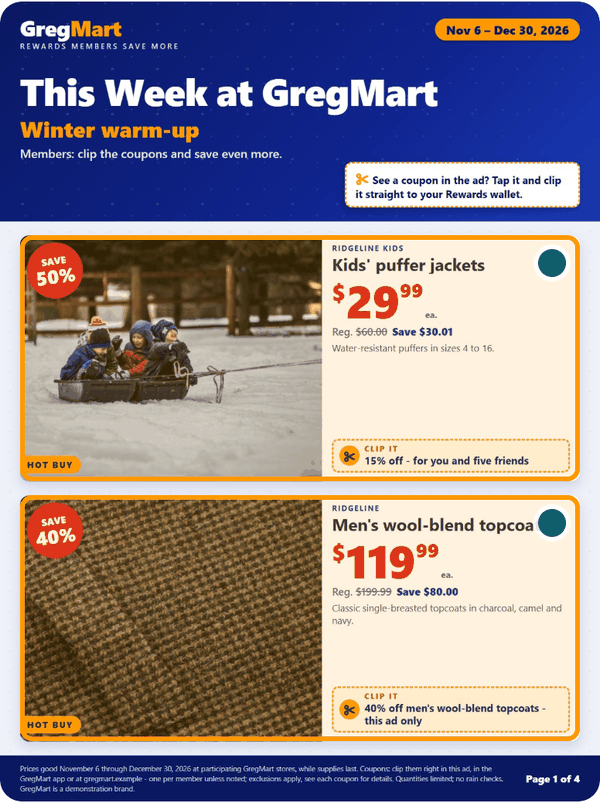
Every item on a page is a place to tap. 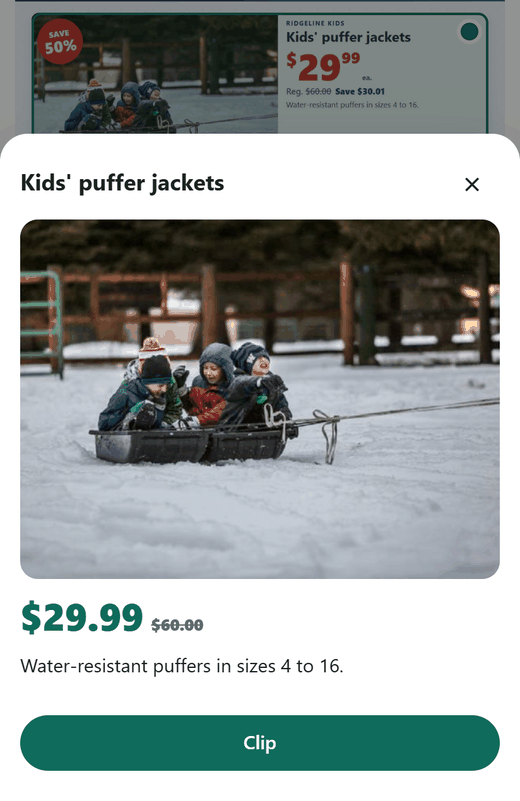
Its sheet, with Clip.
GregMart is a made-up store · Concept demo by Listrak Converse
12:15 PM · she checks the deals over lunch
The deal sniffer’s dial
Every control below writes the real browse filter - the same one the thread, the AI Concierge, the API and the add-ins all read. Turn the dial and the shelf answers live; the tag under it is the one a store would paste.
The tag for this shelf
Deal shoppers look again and again before they buy. Every offer opened on a store’s website, every repeat look at a deal and every coupon clipped is recorded against its offer, and the Stores & Loyalty Center shows which deals pull people in - and who keeps looking without buying.
Read the doc
One filter vocabulary: kind, channel, savings, price, dates, collection, “for me”, words and sort.
An absent member, or an empty list, filters nothing - and a page’s filter is a base the shopper’s own choices narrow, never widen.
When the program opens its shelf to the web, the In store, Online, Both and savings choices also show how many offers each one finds. The add-in on a store’s own website asks the same door for its counts and uses them to number the categories in its filter sheet.
What shoppers searched for and didn’t find is counted for the store’s merchandisers, and never shown on a public page.
- What shoppers search for
- Collections
- Offers
- Coupon codes
- Browse and search (Loyalty API) developer sign-in
The thread, its words and three looks
The same conversation, everywhere
Every command is its own conversation, built from the loyalty verbs, and the conversations hand the shopper from one to another (MENU to COUPONS, COUPONS to MY WALLET) without leaving the thread. Each one fills its moments from the program as it stands right now: the shopper’s name, points and wallet, the coupons, deals and ad that are live today, and the stores nearby. Every command has its own launch code with its own count in Launch Control.
| Command | The verb | What the shopper sees | Outcome | Measured as | Try it |
|---|---|---|---|---|---|
| MENU | loyalty.member | “Hi Jordan - [points] points, [visits] visits, [count] in your wallet ([n] ending soon).” and the menu | The whole program in one thread | Starts on its own code, and the picks in each branch | |
| COUPONS | loyalty.shelf, loyalty.clip | A carousel of coupons, each with Clip | More trips to the store | Searches, clips, codes shown and redemptions by store | |
| DEALS | loyalty.shelf | The deals ending soonest, each with its value, where it works and when it ends | More traffic for the restaurants inside GregMart | Deal searches - each deal opened is counted on the website add-ins | |
| THIS WEEK’S AD | loyalty.circular, loyalty.clip | This week’s ad, its items and Clip it | This week’s ad without the print run | The ad opened, and the clips from it | |
| DEAL HUNTER | loyalty.shelf by collection | Doorbusters, ending soon, under $20 and more | Shoppers act before a deal ends | Searches by collection, and clips | |
| MY WALLET | loyalty.wallet | What Jordan holds, and Use it now | More coupons used at the till | Wallet opens and codes shown | |
| MY POINTS | loyalty.member, loyalty.shelf, loyalty.clip | Jordan’s points and what they’re worth, then the rewards they can get, each with Get it. The Tier chip opens the climb to the next tier. | Points turned into rewards, and a reason to come back and spend them | Rewards put in the wallet, and the points spent when the till scans them | |
| STORES & CHECK IN | loyalty.nearestStores, then loyalty.checkIn in the check-in conversation it hands off to | The nearest stores with their address, distance and phone, then Check in, which asks for your location once more and offers Check in here on the store you’re in | Visits the store can trust | Check-ins, each with the strength of its proof |
Text it to my phone
The same hub on your own phone: text the code to Listrak’s Switchboard. The first time, your phone is registered for Listrak’s private test sender and approval can take up to 24 hours; after that, the conversation starts the moment you text its code. It’s a made-up store, so unless your number is already a GregMart Rewards member, you browse as a guest. Joining GregMart by text comes next.
On a phone, when the conversation ends, text the code again to come back.
Deal Finder, three looks
The same conversation as an AI chat, a text thread and a web form. The AI picks your three answers from one sentence because each choice carries its meaning. Try “something for my dad who cooks, at least a quarter off”.
Live
Sell a deal in the thread, and it lands in the wallet
A conversation takes payment with the Payment moment: Stripe, paid over RCS on a secure page or with one tap on a card the shopper saved, and every charge written to the payments ledger. A restaurant sells its “$20 for $40” in the thread, and the paid voucher lands in the shopper’s loyalty wallet on its own, ready to redeem at the till. See it in Deals, gift certificates and a coupon for a friend.
- Set up checkout and payments developer sign-in
- Deals (Loyalty API) developer sign-in
Read the doc
The verbs - shelf, circular, wallet, member, nearest stores, clip, check in and join - are Action moments any conversation can use. Join signs a shopper up on the phone they’re texting from.
[[Loyalty.*]] puts a member’s name, points and wallet straight into a moment’s words.
Each write is one tap that is also the yes; the AI Concierge face and Deal Finder only read.
- Playbook: loyalty on the thread developer sign-in
- The loyalty verbs (Actions API 23) developer sign-in
- Tokens and RenderAs developer sign-in
- In a conversation (Loyalty API) developer sign-in
- The embed in sixty seconds developer sign-in
Paid for, passed on, spent like cash
Deals, gift certificates and a coupon for a friend
Three things shoppers do with money and with friends, all live: buy a deal in the thread, buy a gift certificate for themselves or for someone else, and pass a coupon to a friend with a link. Every one lands in a wallet and is counted on its own ledger.
Live
Gift certificates
A shopper buys one in a chat on their phone, for themselves or as a gift, and pays on a secure page. It lands in their wallet, ready to print or to pass on.
- For yourself or as a gift. Who it’s for, who it’s from and a message are printed on it, and the buyer can pass it on with a link.
- Printable. One sheet of Letter or A4: the amount in figures and in words, the code with its barcode and QR, and how to use it.
- Spent like cash. At the till or online, a little at a time if they like - what’s left stays on the code, and it never expires.
- Points toward them. When the program allows it, a member puts points toward the price in the chat; a page only says what their points could take off.
On the store’s website above, the Gift certificates tab is the gifts add-in: each certificate’s amounts with their Buy, and Check a balance by the code on the paper.
Live
A deal paid for in the thread, landing in the wallet
Open a deal on the store’s Deals tab above: Text to buy starts the purchase on the shopper’s own phone, with the deal already named. They pay in the chat, the voucher lands in their wallet ready for the till, and the store refunds what’s left unused if it has to.
Live
Share a coupon with a friend
In the wallet, a coupon’s code sheet offers Share with a friend: a link the friend opens to claim a copy of their own, or the coupon itself when the store passes it on. The store sets how many each member may share and can reward the giver with points. It works for real members - your made-up shopper here is told so.
- Share a coupon with a friend
- Claim a coupon a friend sent you
- Deals (Loyalty API) developer sign-in
6:25 PM · she pays at the till
At the till
Use it now
In the box, MY WALLET, then Use it now: the card shows the code as a picture to scan at the register. When the item carries a code a cashier can key in, that code is written beneath the picture too. The web wallet draws a code the same way.
The demo till, live
This is the store’s phone till, running its own code in demo mode. Open a code in the wallet above and tap Read the code the wallet is showing, pick one of the codes the till lists, or type one in - or, to look the shopper up, type the made-up phone number the till shows you (a 555 number, never a real one). The till opens the same wallet the page’s add-ins play - your own made-up shopper’sjust now, Jordan R.’s, the shared sample member’s - reads the code for real and checks what the wallet knows - used, not started, ended, online only, no uses left. A real till also asks about the store and the basket. In the demo, the till stops before it uses the coupon up.
- Scan - the code the wallet is showing, one of your codes, or a code typed in.
- Check - is it this shopper’s, and what does the wallet say about it?
- Redeem - on a real till, one tap uses it exactly once, with a receipt. The demo shows what the clerk sees and stops there.
- Done - on a real till, the store manager’s usage report counts it.
The demo till is best on a computer, where it sits beside the wallet. On a phone it opens on a page of its own: pick one of the codes it lists there.
The real till can’t be put on another page, by design, and needs a staff account. Paired-device and clerk-PIN sign-in come later.
Presenter
Scan the shopper’s code with the real till. Open the item in the hero wallet, and scan its picture with the phone till signed in with a staff account. Redeeming uses that item up in the wallet the page is playing until someone in the Stores & Loyalty Center gives it back.
The redemption app
The real till at go.rcsbuilder.com/redeem, the tool a store’s staff use at the counter every day - here signed in at a GregMart store. The demo till above runs the same screens with Redeem switched off; the real one uses a coupon exactly once, keeps every point on the ledger, and undoes with a reason.
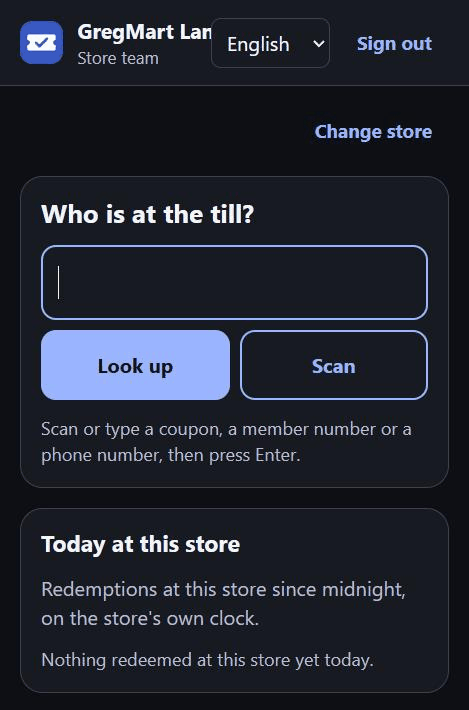
Scan or type whatever the shopper shows. 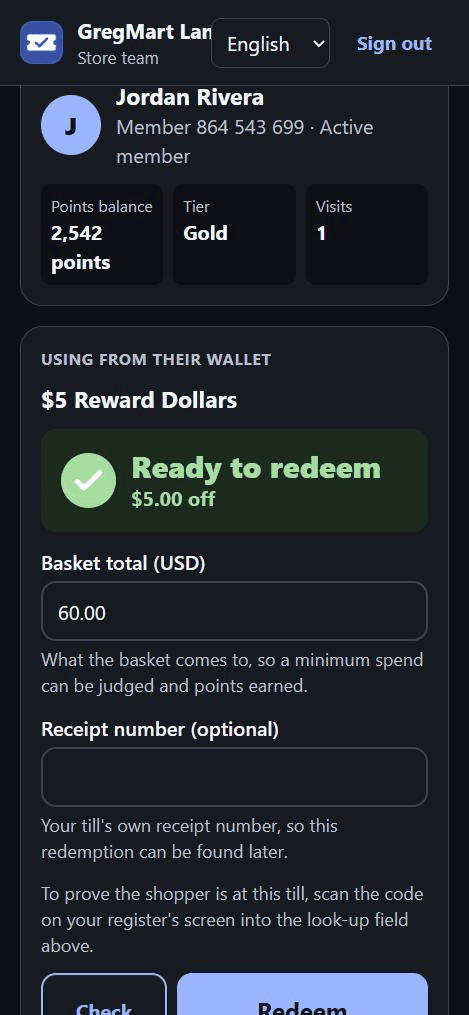
The member, and the coupon ready to redeem. 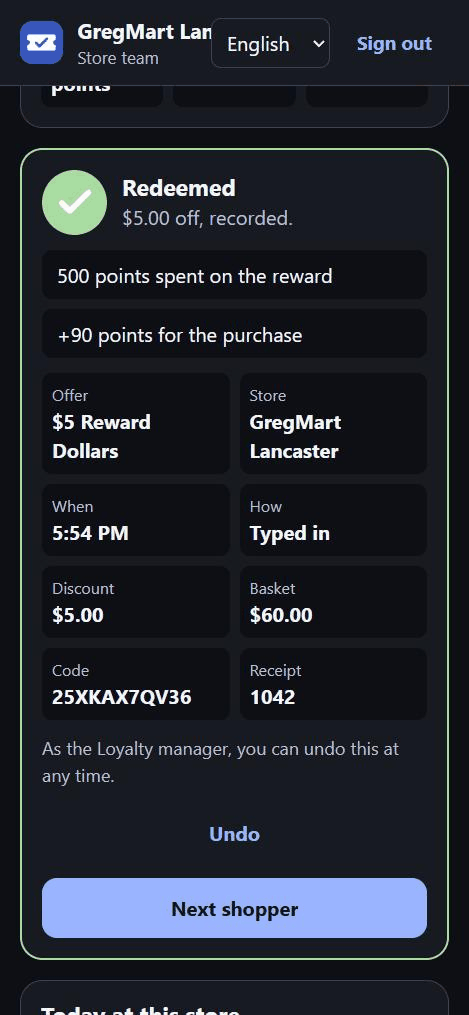
Redeemed once, with every point on the receipt. 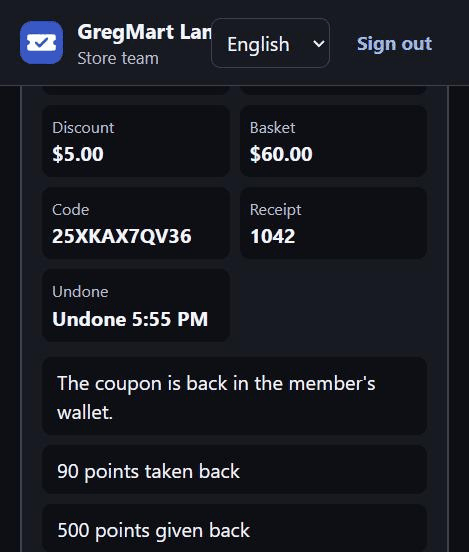
An undo gives the coupon and the points back.
The till on any phone
It’s safe to try again if the connection drops: a coupon is used exactly once, an undo carries its reason, and the store manager gets a usage report.
Check-in you can trust
Every check-in carries its proof, strongest first: the register’s own code, the phone’s location at the store, the store’s code, then the shopper’s word. GregMart counts a visit only from the store’s code or better, so the shopper’s word alone never earns a visit. Check in asks for the phone’s location and measures it against the store’s radius, so if you share where you really are from your desk, the thread tells you you’re not inside the store yet.
Departments, concessions and partners
The merchant tree: a concession sees only its own stores, and its own report. An AI agent never redeems, undoes, issues or adjusts value - a person or the store’s own system does.
Read the doc
The till signs a person in, picks the store, scans or types what the shopper shows, checks it, and redeems it exactly once - with undo and today’s report.
A lost answer is safe: trying again replays the first redemption, never a second one.
Points and visits
Every point and every visit, on one ledger
A member earns points for joining, for a purchase, for a check-in at the store, on their birthday and for a referral, and spends them on rewards. A check-in is a visit, and a reward can be earned with visits as well as points. Each one is an entry on one ledger, so the balance, the tier and the visits a member sees are always the sum of what really happened - in the thread, on the website and at the till.
On the phone
In the thread, MY POINTS answers with the balance, the tier and the rewards the points can buy. After a check-in, the next moment shows a picture Converse draws of the new balance, the points that just landed and how far it is to the next tier, in the brand’s colour.
On the store’s website
The points badge sits in the header with the member’s points and tier - or Sign in for your points - and opens a panel: the balance, the tier and a bar to the next one, the visits, the rewards the points can buy and what is ready to use. The home and wallet add-ins open with the same summary; the wallet beside the box at the top of this page is one.
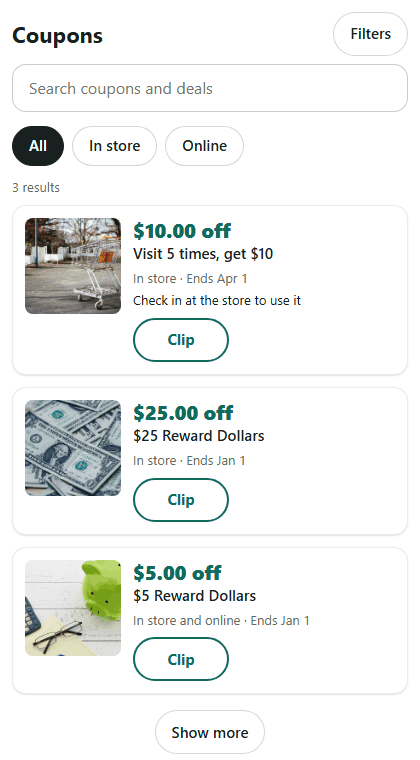
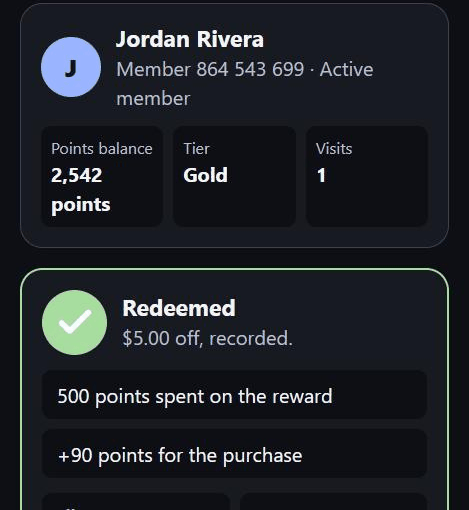
One ledger, every reason
Joining, a purchase, a check-in, a birthday, a referral, a bonus, a reward spent, an expiry, a correction or a reversal - each an entry with its reason, never edited. The balance is their sum, and an undo at the till gives back exactly what the redemption wrote.
Purchases, by the program’s rules
Points for each dollar of the basket, times the tier’s multiplier and the best promotion running, rounded down. No basket total, no purchase points - they are never guessed.
Visits you can trust
A check-in counts once a day per store, and only with the proof the program asks for. Tiers follow lifetime points or visits, and every entry moves the member’s tier at once.
Add points from your own systems
A store’s point of sale, its online shop or a data feed adds points with one call. It uses a POS key - an API key that holds a loyalty role and nothing else. An AI agent reads balances but never moves value.
POST https://api.rcsbuilder.com/api/v1/loyalty/points/append
Authorization: Bearer <your POS key>

{ "memberId": 41, "reason": "purchase", "basketTotalMinor": 6000, "currency": "USD",
  "storeId": 2, "idempotencyKey": "pos-0102-receipt-1042" }
A purchase sends the basket and the program prices it; a bonus or a correction sends its own points, and a correction says why. The same idempotency key answers the entry it already wrote, so a retry never adds twice. A visit comes in the same way, with its proof.
Read the doc
Points are worked out from the program’s rules - how many a purchase earns, the flat awards for a check-in, joining, a birthday and a referral, the tiers and when points expire - set on the program’s page in the Stores & Loyalty Center.
6:26 PM · her points land, and every step she took is recorded
What we measure
We measure every clip. Every door on this page has its own code, and Launch Control counts each time it opens; a bubble in the box’s More at GregMart list opens its conversation on that conversation’s newest RCS code, and the tap is counted on that code. Every offer opened on a store’s website, every search, clip, code shown and redemption lands in a Converse ledger, and the Stores & Loyalty Center reads them back: the funnel for every offer, the activity behind it, the deal sniffers, wallet health and the weekly ad’s numbers.
Your visit
- Clip a coupon, open one in the wallet or tap through the box - each thing you do shows here.
On a store’s own page, the add-ins report every offer a shopper opens straight to Converse. Here they play a made-up demo member, and an add-in never records what a demo member browses, so the offers you open here appear on this list and nowhere else. Your clips, the codes you show and the words you search for still land in their ledgers, just as a real shopper’s would. On a wide screen the wallet, the shelf and the store open by themselves as you scroll to them. This list stays in this tab, is never sent anywhere, and is gone when you reload.
GregMart, live
GregMart’s own numbers, read live from its ledgers - counts only, never a person. Every visitor to this page gets a made-up member, so the members joined include you.
- Members joined
- -
- Coupons clipped
- -
- Redeemed at the till
- -
- Deals sold
- -
- Gift certificates sold
- -
- Store check-ins
- -
Reading GregMart’s numbers...
Your team reads the rest in the Stores & Loyalty Center: the funnel for every offer, redemptions by store, the deal sniffers and what shoppers searched for and didn’t find.
- Redemptions - the usage report
- What shoppers searched for
- We measure everything (Loyalty API) developer sign-in
The words shoppers searched for are never shown on a public page.
Your turn
Your homepage, with deals
Type your website’s address. We read its name, headline and colours, draw a mock of your homepage, and put this week’s ad and the coupons on it, wearing your colour.
Copy the tags
Read the doc
Each add-in is one tag. It wears a clean default look in the accent, background and font you hand it, and wearing your workspace’s own design is on the way.
- Loyalty on your website - the add-ins
- Playbook: loyalty on your website developer sign-in
- The loyalty add-ins (embed reference 17) developer sign-in
Two ways to run it
Be the program, or bring yours
Be the loyalty program
Points, tiers, punch cards, coupons, deals, the weekly circular, collections and store pages - all built in the Stores & Loyalty Center, and live on every screen the moment you publish.
Keep your system, load it in
Stores, category codes, offers and circular items come in by file, REST or MCP, and members by REST or MCP. Your POS keeps redeeming; Converse adds the conversation, the add-ins and the measurement.
Item ID,Item Name,Sale Price,Was Price,Price Text,Unit,Page,Featured,Brand,Category
AD-1001,Strawberries,2.99,4.49,,1 lb,1,yes,Sunny Acres,Produce
AD-1002,Whole milk,3.49,3.99,,1 gal,1,no,Meadow Farm,Dairy
AD-1003,Sourdough bread,,,"2 for $6",loaf,2,no,Hearth and Mill,Bakery
A circular feed, as a file - the shape from Circular feeds.
Hybrid: synced members, with offers built right here.
- The Stores & Loyalty Center: an overview
- Circular feeds
- POS integration guide
- Running the Stores & Loyalty Center
- Members
- Import a file (Loyalty API) developer sign-in
- Members (Loyalty API) developer sign-in
Build it
Everything you need to build it
Try it
Run it in store
Connect your system
For developers and AI agents
- The Loyalty API reference developer sign-in
- Playbook: loyalty on the thread developer sign-in
- Playbook: loyalty on your website developer sign-in
- The MCP connector developer sign-in
- For AI agents · llms.txt
Point Claude at https://api.rcsbuilder.com/mcp with a workspace key. browse_loyalty_items reads the shelf. An agent can browse and build; it never moves value.
New this week
Just landed in Stores & Loyalty
Live
Coupons, deals and gift certificates in the phone’s wallet
Every coupon, deal and gift certificate a member holds goes into Apple Wallet or Google Wallet as a pass of its own: Add to Apple Wallet and Add to Google Wallet sit on the item in the wallet add-in. A gift certificate’s pass shows its balance, and a pass picks up a change when the shopper pulls it down to refresh. Passes we update on the phone ourselves come next.
Live
The AI Concierge looks deals up by itself
Ask it in your own words and it reads the shelf, this week’s ad, the nearest stores and the gift certificate amounts on its own - and a verified member’s own wallet. It never clips, buys or joins for anyone: those stay the shopper’s own taps.
Live
Joining from a website add-in
A shopper who isn’t a member signs in with a code sent to their phone or email, and the sign-in sheet becomes the program’s join form: their first name, the terms, and a separate box for marketing that is never ticked for them.
Live
A different button for each card on a mixed shelf
In the thread, a shelf that mixes coupons, deals and gift certificates gives each card its own button - Clip, Buy or Choose an amount - on RCS, WhatsApp, Apple Messages, the AI Concierge and the web runner, as the website add-ins always have.