
Redemptions
What this page is for
Redemptions is the usage report: every coupon, deal and reward used at your stores and online, with who used it, where, when, how it was used and what it gave. It is the list a merchant asks for at the end of the month, and you can download it.
What you see
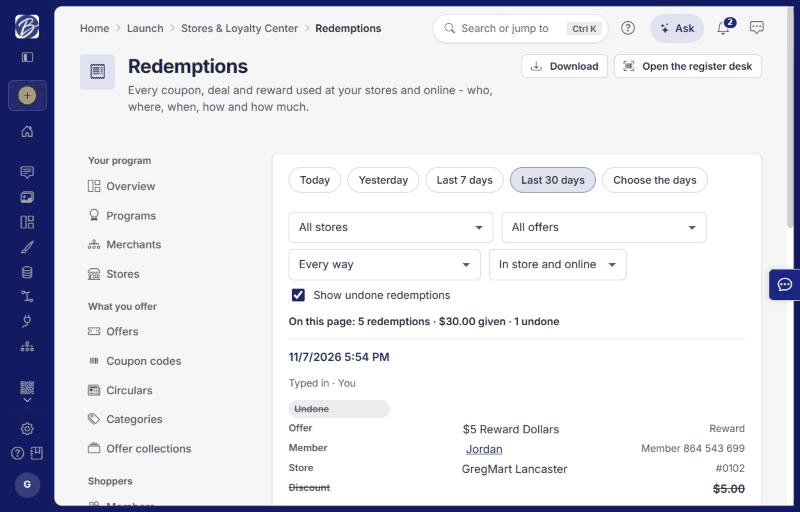
- The days. Chips across the top: Today, Yesterday, Last 7 days, Last 30 days and Choose the days, which opens From and To. Days are in your own time.
- The filters. A store, an offer, how it was used and where: All stores, All offers, Every way and In store and online to start. Show undone redemptions adds the ones that were undone, marked Undone.
- The totals. A line above the list counts the redemptions on the page and what they gave, each currency on its own. Undone redemptions are counted apart and give nothing.
- The list. One row per redemption: when it was made, and how and by whom under it; the offer and its kind; the member's first name and member number; the store; and what it gave. Select the time to open the redemption.
What you can do
See what was used last week at one store
- Select Last 7 days.
- Choose the store in the store filter.
- Use Previous and Next to page through. Clear the filters starts over.
Download the list
- Set the days and filters you want.
- Select Download. Converse reads every redemption that matches - not just the page on screen - and saves them as one CSV file you can open in a spreadsheet, with times in your own time and in UTC. It tells you how many it saved.
Open one redemption
- Select its time in the list.
- Read everything it recorded: the offer, the member, the store, who made it, how, the basket, what it gave, the code and the receipt number.
- When it was undone, the page says when and why.
Undo a redemption made in error
- Open the redemption and select Undo.
- Under Why, say what went wrong. Converse keeps the reason.
- Choose whether to Put the coupon back in the member's wallet, then select Undo the redemption.
Good to know
- A merchant's own staff see only their merchants' redemptions.
- The register can undo a redemption for 10 minutes. A Loyalty manager can undo one at any time.
- Undoing never removes a redemption. It stays on the list, marked Undone, so the record is complete.
- Download saves every redemption that matches your days and filters, up to 50,000 in one file. For more than that, choose fewer days.
- To see one member's redemptions, open their page and choose See their redemptions. Show every member takes the filter off.
- A member's name in the list opens their page, when you may open it.
Related pages
- Redeem at the register: look a shopper up and redeem what they show you.
- Offers: the coupons, deals and rewards in this list.
- Merchants: who honours each offer, and who may see their redemptions.
- Stores & Loyalty Center: your program and the overview.