
Loyalty on the phone - the handset cheat-sheet
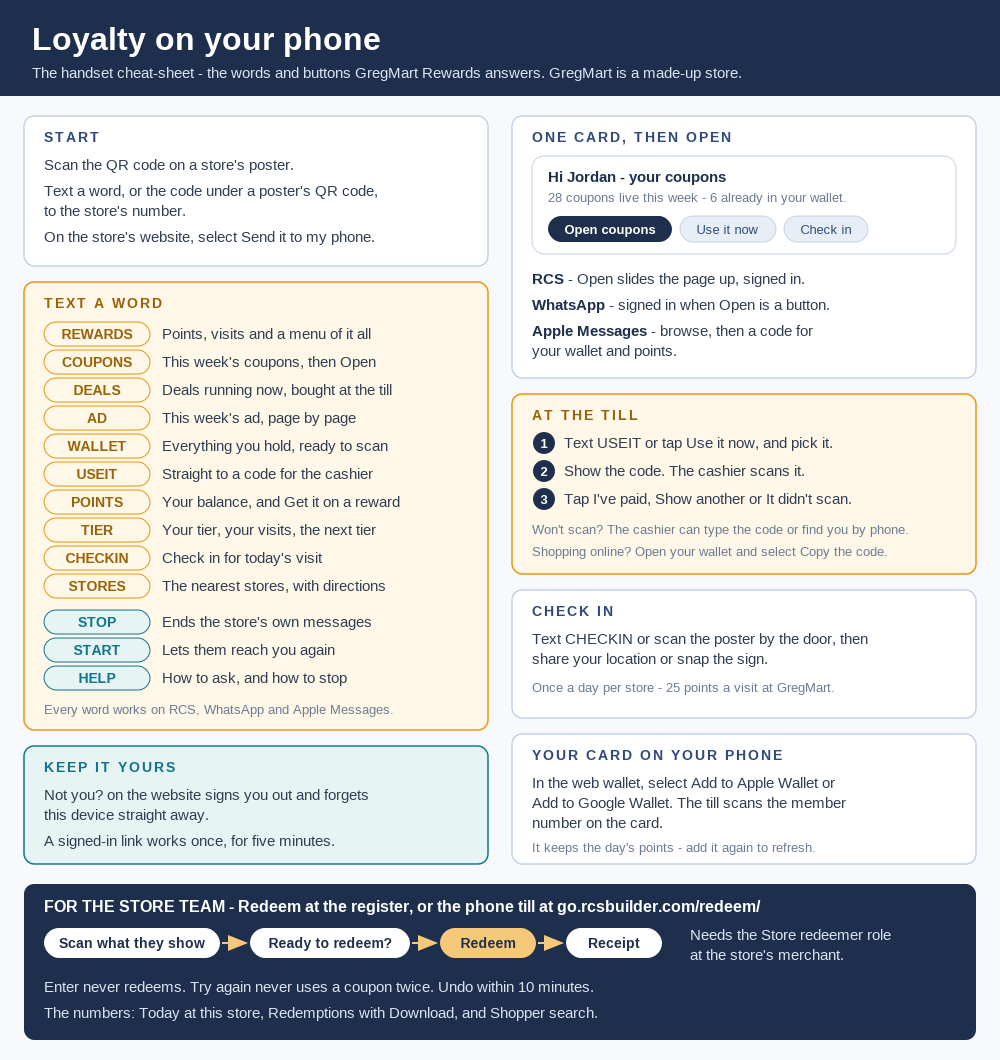
Picture 1. The cheat-sheet on one page, to print or share. The full sheet follows.
Everything a shopper can do with a store's loyalty program on their phone, and the store team's side of it at the till. The words and buttons are the ones GregMart Rewards answers today. GregMart is Listrak's made-up store and Jordan R. is its made-up sample member, so treat GregMart's words as the recommended set and check your own program's with your Loyalty manager. The whole journey is drawn in Loyalty system diagrams.
For the shopper
Start
| Do this | What happens |
|---|---|
| Scan the QR code on a store's poster | The store's conversation opens on your phone. A poster made as a store's door also says which store you are at. |
| Text a word such as REWARDS or COUPONS to the store's number, or the code printed under a poster's QR code | That conversation starts straight away. A word sent as an ordinary text message starts it on RCS. |
| Sign in on the store's website and select Send it to my phone | Your wallet arrives on your phone as a conversation, ready for the till. |
The words to text
Every word works on RCS, WhatsApp and Apple Messages, in capitals or not.
| Text | What comes back |
|---|---|
| REWARDS | A greeting with your points, visits and wallet, then a menu of everything below. |
| COUPONS | One card that says how many coupons are live and how many you hold, with Open coupons. |
| DEALS | One card with the deals running now and Open deals. A deal is bought, never clipped - tap Buy on a deal and pay in the chat. |
| GIFTS | The store's gift certificates, for members - a phone that is not one is told how to join. Choose one, say For me or A gift for someone, pick an amount (or Another amount), choose how many points to use, and pay in the chat. It never expires. |
| AD or WEEKLY AD | This week's ad on one card, with Open the ad to turn its pages. |
| WALLET | Your points and everything you hold, with Open wallet for every code. |
| USEIT or USE IT NOW | You pick an item, and its code appears for the cashier to scan. |
| POINTS | Your balance and the rewards it buys. Get it puts a reward in your wallet. |
| TIER or VISITS | Your tier, your visits and how far you are from the next tier. |
| CHECKIN or CHECK IN | Today's check-in, by your location or a photo of the sign by the door. |
| STORES | The stores nearest to you once you share your location, each card with its own Directions. |
| WEEK, FIND, PICKS, HUNT, LIKES, BIRTHDAY, SHARE and FEEDBACK | What ends this week, help finding something, deals picked for you, the deal hunter's collections, the departments you love, the birthday club, coupons to pass on, and a rating for your visit. |
| STOP, START and HELP | These work for every business and always come first. STOP ends the messages the store starts on its own, on every phone channel, while anything you start still answers you. START brings them back, and HELP says how to ask for what you want and how to stop. |
The card and its Open button
Most words answer with one card and an Open button that opens the full page, with search, filters, every offer's details, Clip and your codes for the till. Under the card, Use it now and Check in are what shoppers usually do next in the store, and Do more lists the store's other conversations.
| On | What Open does |
|---|---|
| RCS | It slides the page up over the conversation, already signed in when your phone number is a member. |
| It arrives signed in when the card has no quick replies. Beside quick replies the link shows as text, and the page asks you for a code. | |
| Apple Messages | It shows the coupons, the deals and the ad. Apple does not share your phone number with the store, so your wallet and points need a code first. |
A signed-in link works once, for five minutes. After that, the page asks for a code and shows nothing about you until you enter it.
Clip, use it and check in
| To | Do this |
|---|---|
| Clip a coupon | Tap Clip, and the coupon is in your wallet. A coupon you hold is never clipped twice. On the website before you sign in, it says Clipped - sign in to keep it. |
| Use it at the till | Text USEIT or tap Use it now, pick the item and show the code. Then tap I've paid, Show another or It didn't scan. A code that will not scan can be typed in, or the cashier can look you up by your phone number. |
| Use it online | Open your wallet, tap the coupon and select Copy the code. |
| Check in | Text CHECKIN or scan the poster by the door, then share your location or snap the sign. A visit counts once a day per store, and your location is never kept. The answer shows your new balance as a card, with the points that just landed and how far you are from the next tier. |
| Check in at the register | Scan the QR code on the till's screen and send the message it writes. Your visit counts at that register, and the answer lists everything in your wallet you can use there, each with its code. The code changes every minute - if it has changed, scan the screen again. |
| Spend your points | Text POINTS and tap Get it on a reward. The points come off when the till scans it. When the store lets points pay toward deals and gift certificates, Use your points toward it? takes them off the price before you pay. |
| Spend a gift certificate | Show its code at the till - on the printed certificate, or on the certificate page Print it opens on your phone. The till takes what you spend and keeps the rest on it for next time. Treat the code like cash: whoever holds it can spend it. |
Your card in your phone's wallet
On the store's website, open My wallet and select Add to Apple Wallet or Add to Google Wallet under Your card on your phone. In the conversation, the WALLET card's Put it on my phone does the same: it opens your wallet already signed in, lights up Your card on your phone and shows the button your phone uses. The card carries your first name, your points and tier on the day you added it, and your member number as a barcode the till can scan. It never shows your phone number or email address. On an iPhone, pull down on the back of the card in Wallet to bring your points up to date. A store has to finish its wallet set-up before a phone will take its card, and until then the page says the card is a test card.
Each coupon, deal, reward and gift certificate you hold can go into your phone's wallet on its own too: open it in My wallet and select Add to Apple Wallet or Add to Google Wallet under Keep it on your phone. A link in the conversation that names one of them, such as Add it to my phone, opens your wallet already signed in on that item with the buttons in view. A gift certificate's pass carries its whole code, which spends like cash, so add it only to your own phone.
Sign in, and keep it yours
- From the conversation, tap Open on RCS, or on WhatsApp where the link is a button, and you arrive signed in.
- On the website, type your mobile number in Your phone or email, select Text me a code, enter the six-digit code and select Sign in. Tick Keep me signed in on this device only on your own phone.
- Not you? under your points signs you out and forgets the device. A website that recognizes you can only ask "Are you Jordan R.?", and nothing opens until a code sent to your own phone or email proves it.
- If you are not a member yet, the coupons, deals and ad still work, and the page tells you where to join, which today is at the register.
For the store team
The desk
You redeem on Redeem at the register in the Portal, under Shoppers, or on the phone till at go.rcsbuilder.com/redeem/, which Open the till on your phone opens from the Portal's desk. Both run the same checks. You need the Store redeemer or Loyalty manager role at your store's merchant.
What to scan into the one field
| The shopper shows | What you get |
|---|---|
| A coupon's QR code, or a coupon code such as SAVE5-7QK2 | That coupon, judged for your store right now. |
| Their member card in a phone wallet, or their member number | The member and everything they hold. |
| Their phone number | The member, within the program you choose. |
| The code on your register's screen | Proof the shopper is at your till, shown under Register code. |
| A gift certificate's code | Gift certificate and what is left on it - never who holds it. Type the amount to take, or leave it blank to take the smaller of what is owed and the balance. The receipt says what is left. |
Redeem exactly once
- Scan or type what the shopper shows and press Enter. For a member, select Use this beside the item they want.
- Read whether it can be used: Ready to redeem, Check at the till first or Can't be used here now, with the reasons.
- When it asks, type the basket total, and tick the box once you have checked the basket at your till.
- Select Redeem, read the receipt, then select Next shopper.
Pressing Enter never redeems, so a scanner cannot redeem by accident. If the connection drops, select Try again: the coupon is never used twice, and when the first try landed you see that receipt. A coupon another till already took is recorded with Used at another till? and Record the use.
To undo, select Undo on the receipt, say why under Why, leave Put the coupon back in the member's wallet ticked and select Undo the redemption. You can undo at the register for 10 minutes, and your Loyalty manager can undo at any time. An undone redemption stays on the record, marked Undone, and its points are taken back.
Where the numbers are
| Look at | To see |
|---|---|
| Today at this store | Every redemption at your store since midnight, on the store's own clock. |
| Redemptions | Every use at your stores, with who, where and when, filtered by store, offer and dates, with Download. |
| Overview | The program's figures, such as Members, Stores, Live offers and Live circulars. |
| Shopper search | Your shelf as a shopper finds it, and the searches that found nothing. |
Demo it in two minutes
- Open Listrak Stores & Loyalty and, under Try a command, tap COUPONS. On a wide screen, Open coupons opens the page beside the conversation, signed in as Jordan R. Clip a coupon.
- In One card, and Open, tap Show my wallet. The card's Open slides the wallet up inside the conversation box, the way it opens over a real RCS thread, and beside it Your card on your phone shows the member card a member adds to a phone's wallet.
- Tap MY WALLET and open a code, then select Open the demo till and Read the code the wallet is showing. The demo till checks the code for real and stops just before it would use it up.
- Everything there is counted on Jordan, a made-up member, and never on a real shopper.
Before the posters go up
- Ask your Loyalty manager to print each door's poster from a code made as that store's door, so a scan or a photo of the sign proves a visit at that store and no other. A poster from an ordinary code still opens the conversation, but the check-in then relies on the shopper's location.
- Print the words your program answers on the poster, such as "Text COUPONS", for shoppers who would rather text than scan.
Read next: Merchant redemption guide, Loyalty system diagrams, the website add-ins and Playbook: loyalty on the thread developer sign-in.