
Stores & Loyalty Center
Everything about running stores and loyalty on Listrak Converse, in one place and in the order you need it - for the store teams who redeem at the till, the POS partners who connect a register, the integrators and AI agents who automate it, and the people who run the program.
The Stores & Loyalty Center is where a brand runs its stores and its loyalty program inside Listrak Converse. It holds the brand's merchants - the brand itself, then its departments, concessions and partners - and the real stores each one runs, with their hours, their pin on the map and the stories told about them. It holds the programs members join, with their points and tiers; the offers they get, which are coupons they clip, deals they buy and rewards they earn; the coupon codes behind those offers; the weekly circulars, page by page, with every item on sale; and the members themselves, each with a wallet of everything they hold. When a shopper shows a coupon at the till, the store redeems it, and Converse records the use exactly once - so the same coupon can never be used twice, and every report a merchant reads counts from the same ledger.
A shopper meets all of this inside a conversation - on RCS, on the web or with the AI Concierge - often by scanning the code at a store's door. A store team meets it at the register. Your systems meet it through the API and the MCP tools, with one set of rules for every door. The Center sleeps in a workspace until the Loyalty skill is switched on, and switching it off again deletes nothing.
Who it is for
- Merchants and their store teams. The people at the till who look a member up, check a coupon and redeem it, and the managers who read the usage report at the end of the month. You need a sign-in that can redeem at your store.
- POS partners. The companies whose point-of-sale systems run the registers. Your system looks a member up, checks a coupon, redeems it and voids a mistake through the same doors a store team uses, with a key that can do nothing else.
- Integrators and AI agents. The developers who bring an existing club's stores, members and offers in, keep them in step and read the ledger out - and the agents who work beside them. Every door is a REST call and a typed tool on the MCP server.
- The people who run the program. The brand's loyalty managers, who set up the program, its merchants and stores, design the offers, publish the circulars and look after the members in the Portal.
Start here
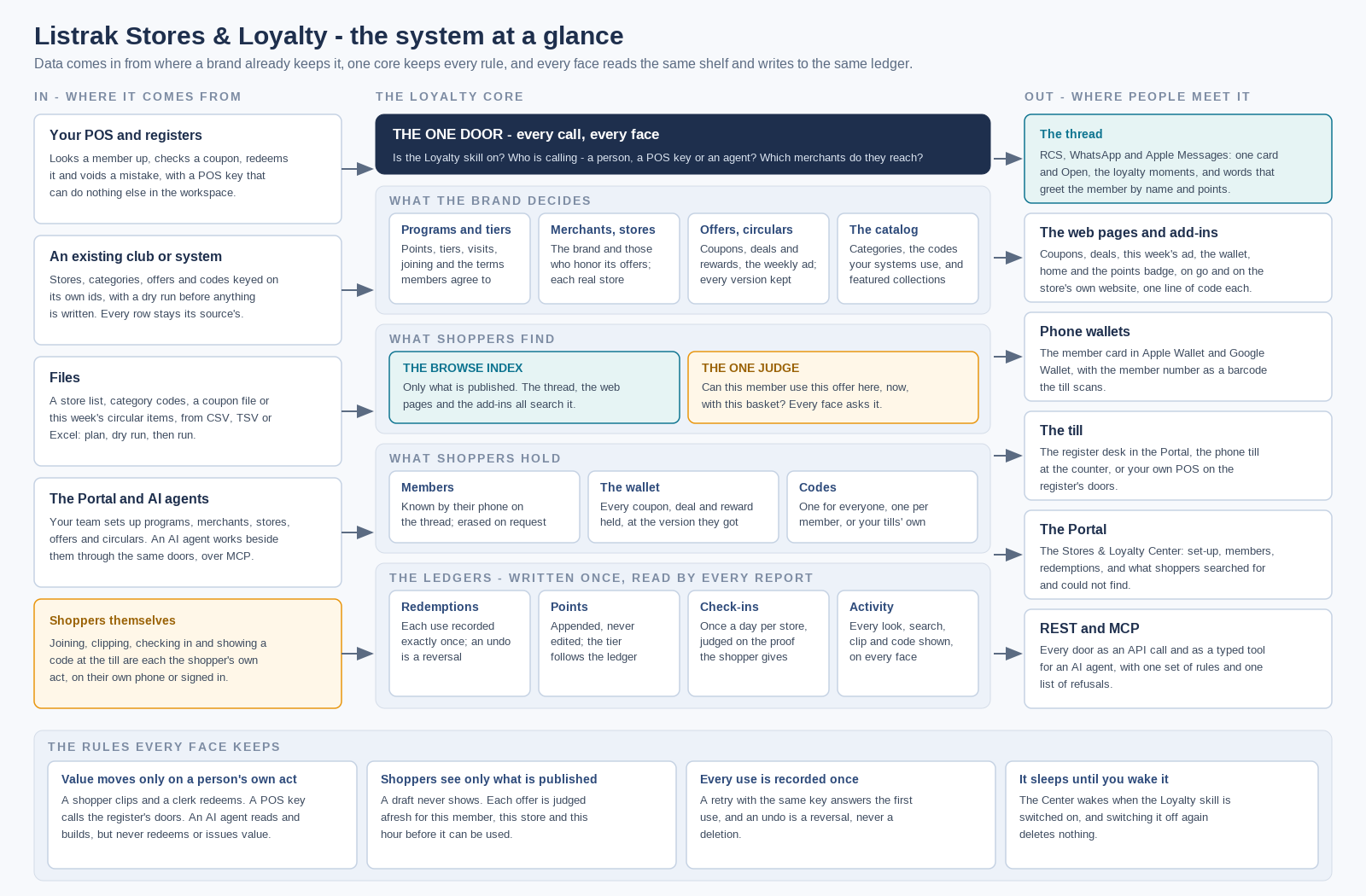
The whole system in one picture - the Loyalty system diagrams tell it in four, with the words beside each.
The Stores & Loyalty Center guide is the tour of the Center in the Portal: what each page is for, how a program is set up, and how the merchants, stores, offers and circulars hang together. Read it first whatever your role, then follow the path that fits you below.
Two quick companions sit beside it. Loyalty system diagrams shows the whole system in four pictures: the system at a glance, a member's day at the store, a redemption at the till, and the data in and out. The handset cheat-sheet is the handout for a shopper's phone and the store team who demos it: the words to text, the card and its Open button, clipping, using a coupon at the till, checking in, points, the member card in a phone's wallet, and the register desk.
Putting a retailer's program on its own website? Stores & Loyalty on your website - the integrator's guide developer sign-in is written for you: the add-ins on the pages, how a shopper is known on each face, and every hand-off between the website, the phone and the till.
For merchants and their store teams
- The handset cheat-sheet - everything a shopper can do on their phone, and the store team's side of it, on one handout to print or share.
- Merchant redemption guide - how a store redeems at the till, step by step, with a picture of every screen.
- Redeem at the register - the register page in the Portal: take what a shopper shows you, see what it gives, and use it exactly once.
- Redemptions - the usage report: every coupon, deal and reward used at your stores, with who used it, where and when, ready to download.
- Activity - everything shoppers did with your offers and circulars, newest first: who looked, who saved, who came back to it and who used it, ready to download.
- The till on your phone - the same register desk, made for a phone in your hand at the counter: sign in, scan what the shopper shows you and redeem it exactly once. Its demo till lets anyone try it with no account.
- Gift certificates - selling gift certificates in a chat and on your website, printing them, passing them on and spending them at the till a little at a time - and what you still owe on them.
- Gift certificates and the law - what Converse enforces for every brand, what it shows your finance team, and what your counsel decides.
On a store's own website and in conversations
- Stores & Loyalty on your website - the integrator's guide developer sign-in - the one guide for standing a retailer's program up on its own website: what goes on the pages, how a shopper is known on each face, and every hand-off between the website, the phone, the phone's wallet and the till, in both directions. Start here if you are putting loyalty on a site.
- Loyalty on your website - the add-ins - the coupons, deals, this week's ad, points and the member's wallet on any website, from one line of code each.
- Playbook: power loyalty on your website developer sign-in - an AI agent's or a developer's path from an empty page to the add-ins, signed-in members and the numbers.
- Playbook: loyalty on the thread developer sign-in - putting the coupons, deals, the weekly ad and the wallet inside a conversation on RCS, WhatsApp and the web.
- The loyalty verbs developer sign-in - what a conversation calls to browse the shelf, clip a coupon and show the wallet.
- Identity across every face developer sign-in - how the same shopper is known on the thread, on the store's website, in the web wallet and at the register, and how they cross from one to another: the member ticket your server mints, the code sign-in, the thread's Open card and the register's rotating code. Start here before standing the program up for a retailer.
See it live
Listrak Stores & Loyalty is the whole system on one page, played on GregMart, a made-up store: the conversation and the live wallet side by side, a real phone's view, a store's website wearing the add-ins, the deal sniffer's dial, one card and Open sliding the wallet up over the conversation, the member card for a phone's wallet, the demo till and what we measure. Its guides page carries the public guides above, readable and downloadable with no sign-in.
The demo walk-through takes you through that page stop by stop - what to tap, what happens and what it proves, with a picture of every screen - then through the redemption app a store's staff use at the till, and the Stores & Loyalty Center in the Portal, screen by screen. Use it to present the demo, or hand it to a prospect to walk alone.
For POS partners
- POS integration guide - connecting a point-of-sale system: the calls your register makes to look a member up and to check, redeem and void a coupon, and how your system's own calls map onto ours.
- The register's doors developer sign-in - the exact requests and answers for looking up, checking, redeeming, voiding and marking a coupon used.
- The conventions developer sign-in - read these before your first call, above all the POS key: value only ever moves with a key that holds a loyalty role and nothing else.
For integrators and AI agents
- Stores & Loyalty on your website - the integrator's guide developer sign-in - put the add-ins on a retailer's pages, sign members in with your own accounts or a code, and wire every hand-off to the phone and the till.
- Playbook: stand up a loyalty program developer sign-in - where an AI agent
starts when a brand asks it to set up loyalty: the Loyalty pack switched on, the program and its tiers, the merchants and the
people who work for them, the stores, the categories, a coupon judged and published, this week's circular drafted from its page,
the codes and the first members - then the till handed to the person who pairs it. Every step is a tool on the MCP server and the
Portal's copilot, and an agent can read this whole kit there too (
docs_index,docs_read). - Circular feeds - bringing a weekly circular in from your own systems: its pages, the items on sale and the stores it runs at.
- The Loyalty API developer sign-in - every door, over REST and as an MCP tool, with one set of rules: programs and tiers, merchants and who reaches them, stores and their stories, categories and collections, offers developer sign-in, circulars developer sign-in, browse and search developer sign-in, members developer sign-in, codes developer sign-in, the wallet developer sign-in, points developer sign-in and check-ins developer sign-in.
- On your website - the shopper's doors developer sign-in - what a brand's own website reads: the public shelf, signing a member in, the member's own wallet, and the activity the add-ins record.
- Phone wallets developer sign-in - the member card in Apple Wallet and Google Wallet, and the secrets a workspace enters before a phone will take it.
- A store's door developer sign-in - a launch code bound to a store, and the photo of the door's sign that proves a visit.
- Import a file developer sign-in - bring a store list, category codes, a coupon file or this week's circular items in from a spreadsheet: plan how the columns map, try a dry run, then run it.
- Refusals developer sign-in - every refusal word a door can answer, and what it means.
For the people who run the program
These are user guides, written for a person at the screen. Each one also opens in the Portal, from the ? on its page.
- The Stores & Loyalty Center - the program itself: points, tiers, check-ins, joining and the terms members agree to.
- Merchants - the brand and everyone under it who honours its offers, their people and who may reach what.
- Stores - each real store's details, its pin on the map, its hours and holidays, and its stories.
- Offers - coupons, deals and rewards: what each one gives, where and when it works, who it is for and how it looks.
- Coupon codes - one code everyone types, a unique code for each member, or the codes your tills already know.
- Circulars - your dated sale flyer, its pages and the items on sale, linked to coupons shoppers can clip.
- Categories - the category tree everything is filed under, and the codes your other systems use for it.
- Offer collections - the sets of offers you feature, which become the carousels a shopper sees first.
- Members - finding a member, their wallet, their points and visits, and erasing a person who asks to be forgotten.
- Redeem at the register and Redemptions - the till and the usage report, as above.
- Activity - the row-by-row story behind the Overview's numbers, and the download for a spreadsheet.
- Shopper search - your shelf exactly as a shopper finds it, and the searches that found nothing.
- POS connections - a preview of how the point-of-sale systems your stores ring up sales on will connect to Converse.
Take the whole kit with you
Every public Stores & Loyalty document is ready to take with you, including the API reference and the user guides that also
live in their own sections. On the developer portal, the Stores & Loyalty launch pad - the landing page
of this center, also at /stores - opens with an index of every document, lists each one again further down with its own PDF
and Markdown, and offers two buttons that gather the whole kit into a single zip: one of every PDF and one of every Markdown
file, each labelled with how big it is. The PDF Library lists the same set under Stores & Loyalty, ready to attach to
an email or hand to a partner.
The guides written for merchants, store teams, POS partners and shoppers are also on the showcase's own
guides page, each with its PDF and one zip of them all, with no
sign-in; the API reference and the playbooks stay on the developer portal.
What to read first, and what is reference
| Read | When | Kind |
|---|---|---|
| The Stores & Loyalty Center guide | your first day, whatever your role | Start here |
| Loyalty system diagrams | when you want the whole picture before the details | Start here |
| The handset cheat-sheet | before you demo it, or to hand to a shopper or a store team | Start here |
| The demo walk-through | before you present the live demo, or to walk it alone | Start here |
| Merchant redemption guide | before a store's first redemption | How to |
| Gift certificates | before you sell your first gift certificate | How to |
| Gift certificates and the law | before you sell gift certificates, with your counsel | Reference |
| Redeem at the register | at the till | How to |
| Stores & Loyalty on your website developer sign-in | before you put loyalty on a retailer's website | How to |
| POS integration guide | when a register system connects | How to |
| Circular feeds | when your circular comes from your own systems | How to |
| Identity across every face developer sign-in | before you connect a retailer's website, thread and till | How to |
| The Loyalty API developer sign-in | when a developer or an agent automates it | Reference |
| Refusals developer sign-in | when a call is refused | Reference |
Getting help
The ? button on every page of the Stores & Loyalty Center in the Portal opens the guide for that page, and Help at the foot of the Portal's menu answers questions asked in your own words, from the same guides. A POS partner or an integrator can point an AI assistant at the MCP server, where every door above is a tool and the assistant can read the Loyalty API and the user guides for itself. Your contact at Listrak is always glad to help.